Professional and Streamlined Image Converter for Personal Computers

Soft4Boost Image Converter is an excellent tool for users who have been looking for an efficient and streamlined method to modify an existing image file. This centralized platform is able to work with a number of file types and most conversions will take only seconds to complete. These images can then be embedded within existing websites, shared with others or stored until a later date. There are a number of additional functions that users can enjoy.

Basic Tools and Features

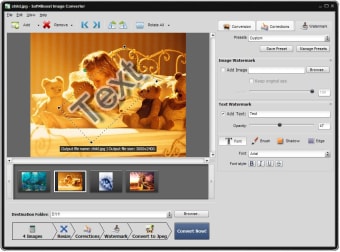
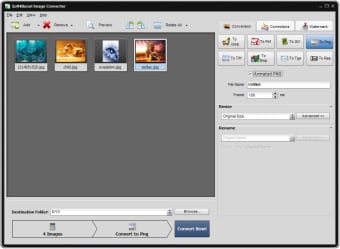
Soft4Boost Image Converter recognises all major file types including (but not necessarily limited to) JPEG, PDF, RAW, PSD and DNG. This is highly advanced when compared to other platforms which offer only a handful of options. Users also have the ability to change the size of an image or to rotate it to a different axis, often advantageous when uploading certain files from smartphones or tablets.

Other Unique Options

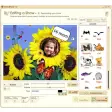
Another distinct advantage associated with Soft4Boost Image Converter is that users can add watermarks onto an existing image. This is helpful in terms of creating intellectual property rights or when sending a proprietary file to a third party. Other effects such as a patina or a black-and-white scheme can likewise be added with the mere click of a button.

  • Pros

    • An ideal alternative to complicated editing packages.
    • This program will not require much memory within an existing hard drive.
  • Cons

    • There is currently no free version of this software available
    • At least one gigabyte of spare RAM is required
 0/2

App specs

Program available in other languages


Icon of program: Soft4Boost Image Converte…

Soft4Boost Image Converter for PC

  • Trial version
  • 4.4
    7
  • 1.4K
  • V8.3.1.541

User reviews about Soft4Boost Image Converter

Have you tried Soft4Boost Image Converter? Be the first to leave your opinion!

Add review

You may also like

Alternatives to Soft4Boost Image Converter

Explore Apps

Latest articles

Laws concerning the use of this software vary from country to country. We do not encourage or condone the use of this program if it is in violation of these laws.
Softonic

Is Soft4Boost Image Converter safe?

100/100

Score result: Clean

This file passed a comprehensive security scan using VirusTotal technology. It is safe to download.

  • Virus free
  • Spyware free
  • Malware free
  • Verified by Security Partners

    VirusTotal logo

Scan Info

Last scan
Friday, September 12, 2025
Scan provider
VirusTotal · Full report

File Integrity

File
Soft4Boost_Image_Converter_V8.3.1.541.exe
SHA256
ff79947994da2b547eef10977dd1b52a8bd0b7baba9d12239e7f5196939ec1f8
SHA1
265102c7d315910598e77b1441e1d8ff7facec85

Softonic security commitment

Soft4Boost Image Converter has been thoroughly scanned by our advanced security systems and verified by industry-leading partners. This file comes from the official developer and has passed all our security checks, showing no signs of viruses, malware, or spyware. For more information, visit our Security and Trust Center